Master the Transition to the Business Partner! Integration of Customers and Vendors
March 24, 2025 | Reading time: Approx. 6 minutes

Antje Diekhoff & Mathias Cararo
SAP consultants at FIS
The new business partner concept of SAP S/4HANA is a challenge for many companies. Successful integration requires adequate preparations. This excerpt from the “SAP Business Partner and Customer/Vendor Integration” reference book (SAP PRESS) by the FIS transition experts explains what should be noted in advance.
You should intensively deal with your migration project prior to starting it in order to avoid possible stumbling blocks. Numerous settings can already be made before the actual customer/vendor integration facilitating your start into the challenging project.
This section describes the option of integrating customer and vendor master records in one business partner.
This integration may be crucial for your number assignment. If your customer and vendor master records already have identical numbers, you can keep these numbers as numbers for the new business partner objects.
However, this kind of number identity is quite rare in an SAP ERP system. In practice, customer and vendor masters normally have independent and, consequently, different numbers.
Separate master records
Basically, it is possible in an SAP ERP system to map a company representing both your customer and vendor. However, this first requires the creation of two independent master records.
Next, this two master data is linked with each other manually by defining, for instance, the vendor number in the customer master or the customer number in the vendor master.
Linking of master data
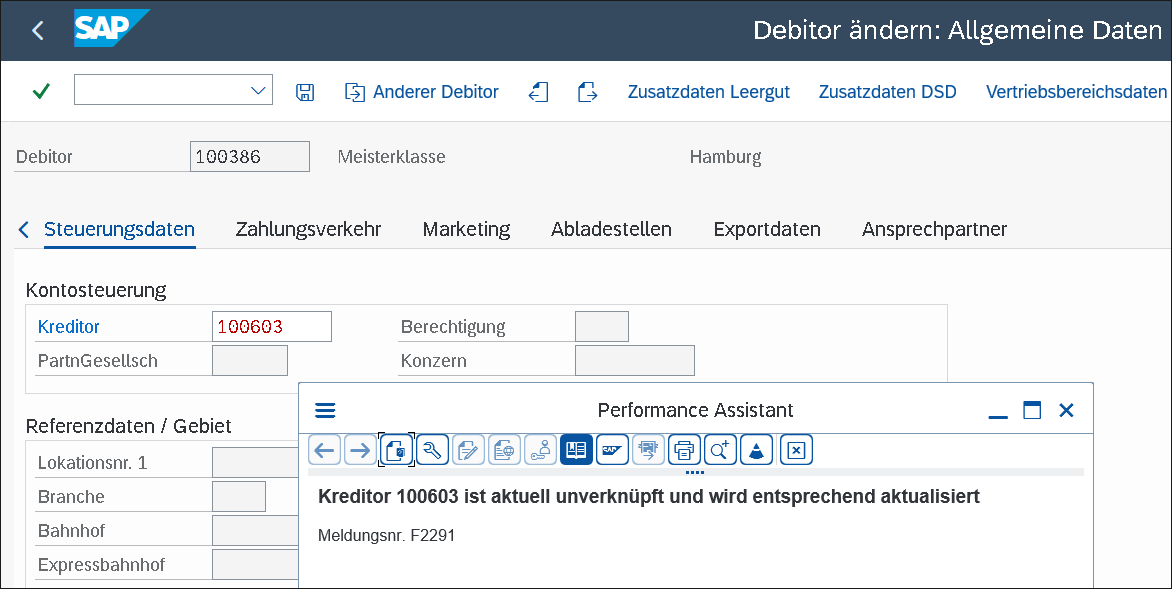
Figure 1 shows an example of linked master data. This linking is technically defined in the LIFNR field (vendor) of table KNA1 (customer master – general part).
Via transaction XD02 (Change customer), you maintain the Vendor field in the control data. In addition, the KUNNR field (customer) (customer number) is filled in table LFA1 (vendor master – general part).
You can use the values of these tables as a basis for estimating how many master data is linked with each other in your system. This can help you find out whether this linking plays a rather subordinate role in your system or is a decisive factor for the integration of customer and vendor data.
A basic disadvantage is that the SAP ERP system does not at all compare or check, for instance, the general data of a customer or vendor. It may therefore well be that a customer and a vendor master record refer to the same company but with different addresses or tax numbers.
Multiple assignment
Equally, the SAP ERP system does not check the linking described above against multiple assignments or wrong assignments of linked master data.
It may happen that master data of different companies is linked with each other in the system or that even multiple assignments have been made for a master record.
It is also possible that a master record is only linked unilaterally. This constellation will arise once you remove the linking in a master record already created without also removing it from the linked master record in the change mode.
As a result of a CVI, such inconsistencies may require extensive and time-intensive corrections by the user departments.
During the synchronization of master data as part of the customer/vendor integration, the system passes much tighter controls. The integration may cause error messages if, for instance, the house number within an address is specified in the Street field of a master record and in the House number field of the linked master record.
BAdIs for master data synchronization
SAP note 2968536 (Behavior harmonization when linking customer and vendor into one single business partner) describes the implementation of Business Add-In (BAdI) CVI_MAP_LEGAL_ENTITY and the more complex BAdI CVI_CUSTOM_MAPPER. This implementation is passed each time you synchronize master data.
Basically, these two BAdIs enable you to interfere in the synchronization process.
Prerequisites for master data integration
The following prerequisites must be fulfilled to enable the system technically to integrate master data under one business partner number:
SAP provides you with a check report that identifies these discrepancies and also enables an automatic correction. SAP note 2716945 (CVI: Consistency error – message no. R1367) includes a detailed list of further fields that are checked during integration. If required, the check of specific fields can be suppressed via a customer-specific adjustment.
Conclusion
Mit The implementation of the business partner as leading entity means that a new and independent number for the business partner is added to the previously known numbers of customers and vendors.
As part of CVI, your task will be to check your existing number ranges and harmonize them with the new business partner number depending on your requirements.
This excerpt comes from the “SAP Business Partner and Customer/Vendor Integration“ book of Rheinwerk Verlag and was revised editorially.

Questions about this topic? Our team will be happy to assist you personally.

Read, take a look, inform yourself
In our download section, you will find a large number of SAP contents worth knowing – expert talks, white papers and flyers. To find right away what you are looking for, please use the filter function for topics and content type.
