Order responses in SAP
This specialist article describes what is behind FIS/edc, the SAP optimization for order responses, how it works and the advantages it provides.

Product Manager at FIS
What is FIS/edc for order responses?
FIS/edc for order responses is a solution for the automated processing of order responses in the SAP system. Purchasing and procurement departments benefit from FIS/edc for order responses through the automated processing of inbound documents, such as order responses. The documents received are displayed in the solution for order responses from where they are imported directly into the SAP system. The response is assigned to the purchase order. If this assignment causes variances between the two documents, the purchaser can check and change the purchase order once more. If both documents correspond to each other, the order response will be updated automatically.
What functions does the FIS solution for order responses include?
The solution for order responses provides numerous functions for the automation and optimization of the order response processes:
1. Automatic entry and assignment of order responses
Incoming order responses are automatically imported into the SAP system and assigned to the corresponding purchase orders. It doesn’t matter whether the response is received as a paper document, e-mail, PDF or in electronic form (EDI) – the monitor recognizes the document, extracts the relevant data and assigns it to the appropriate purchase order.
2. Direct comparison with purchase orders in the SAP system
The software compares every incoming order response with the existing purchase orders in the SAP system. Article numbers, quantities, prices, delivery dates and other relevant information are checked. If the details match, the response is updated automatically.
3. Identification of deviations between purchase order and response
If there are differences between the original purchase order and the response (e.g. in prices, delivery quantities or delivery dates), the monitor recognizes them immediately. Such deviations can be marked automatically and forwarded for manual checking or rule-based processing.
4. Rule-based processing and tolerance check
Unternehmen können individuell definieren, welche Abweichungen akzeptabel sind und welche eine weitere Prüfung erfordern. Beispielsweise lassen sich Toleranzgrenzen für Preisabweichungen festlegen. Liegt eine Abweichung innerhalb dieser Grenzen, kann die Bestätigung automatisch freigegeben werden. Ansonsten wird der Sachbearbeiter informiert.
5. Möglichkeit zur manuellen Nachbearbeitung
Companies can individually define which deviations are acceptable and which ones require further examination. Tolerance limits for price variances, for example, can be set. If a deviation is within these limits, the response can be released automatically. Otherwise, the accounting clerk is informed.
6. Support of various document formats
The FIS/ed solution processes responses in different formats:
7. Integrated workflows for efficient processing
The monitor supports companies with an automated workflow that informs all relevant persons within the company about required releases or corrections. Once a deviation is detected, the monitor can send an automatic notification to the responsible accounting clerk and trigger further processing.
8. Seamless integration into the SAP standard version
The order response monitor is fully integrated in SAP ERP and SAP S/4HANA. This ensures a standardized data basis that does not require any additional external systems. The order responses are linked directly to the purchasing documents in the SAP system so that all relevant information can be called centrally.
9. Automatic documentation and archiving
All order responses are archived in an audit-compliant way and can be called via the SAP system at any time. This not only makes it easier to track order processes but also helps with audits and compliance checks as all changes are logged in a traceable manner.
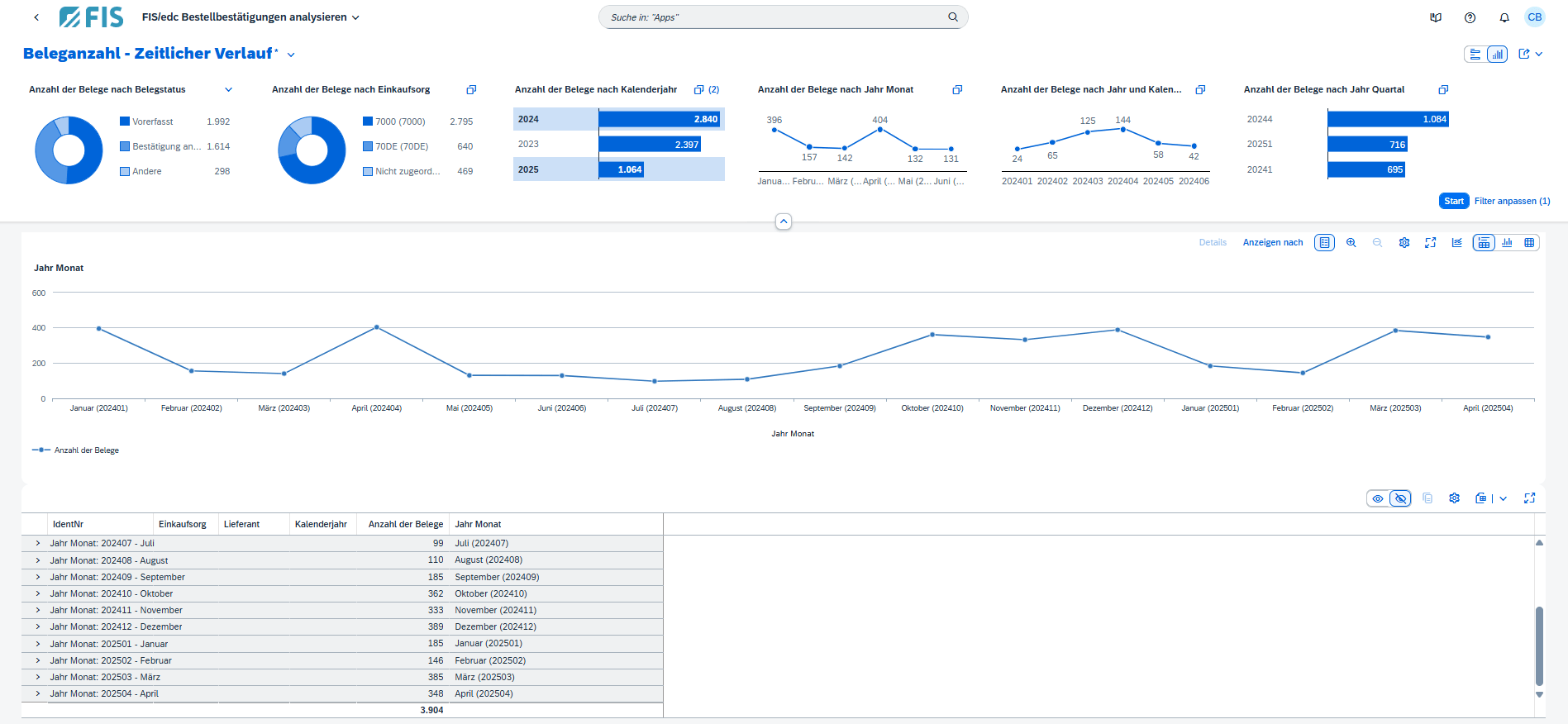
10. Maximum transparency due to the FIS/edc Dashboard
The user has the option of displaying important key figures for their order responses in the FIS/edc Dashboard.
What are the benefits of FIS/edc for order responses?
How can automation be successful?
Order response processing is automated by using intelligent technologies:
What enterprises is the solution suitable for?
FIS/edc for order responses is aimed at purchasing departments in companies that have to process large quantities of order responses. The solution is also aimed at companies with complex procurement processes that are looking for an efficient processing of their order responses. Learn here how we at FIS implement FIS/edc for order responses projects.
Conclusion
FIS/edc for order responses is more than just a document processing tool – it is the key to an automated and transparent purchasing process. With intelligent data recognition, seamless SAP integration and a clear monitor, the solution noticeably reduces the workload of your purchasing team. Manual checks are minimized, deviations are detected at an early stage and responses are securely updated – regardless of the format in which they are received. For anyone who wants to make their procurement processes future-proof, efficient and digital – audit-proof, SAP-integrated and maximally transparent.
FAQ – Frequently asked questions
Verwandte Themen