Skip to content

Payment advices in SAP 

Payment advices in SAP

This specialist article describes what is behind FIS/edc, the SAP optimization for payment advices, how it works and the advantages it provides.

Florian Mahlmeister

Product Manager at FIS

What is FIS/edc for payment advices?

FIS/edc for payment advices is a solution for the automated processing of payment advices in the SAP system. Companies receive payment advices from customers in different formats (e.g. PDF, EDI, Excel or paper). The solution automatically recognizes and processes this payment advice data and compares it to the open items in SAP. In this way, incoming payments are updated faster and more accurately, which increases the efficiency of customer management.

Payment advices in paper form or as PDF documents are automatically processed via OCR document recognition with excellent recognition rates. Electronic documents, such as EDI formats, are supported as well. Once the documents have been imported, they will automatically be assigned to the existing data records in the SAP system. If no match can be found or errors are detected in the payment advice, corrections can directly be made in FIS/edc for payment advices. Once all items have been matched correctly and payment has been received, the items assigned are automatically updated in SAP.
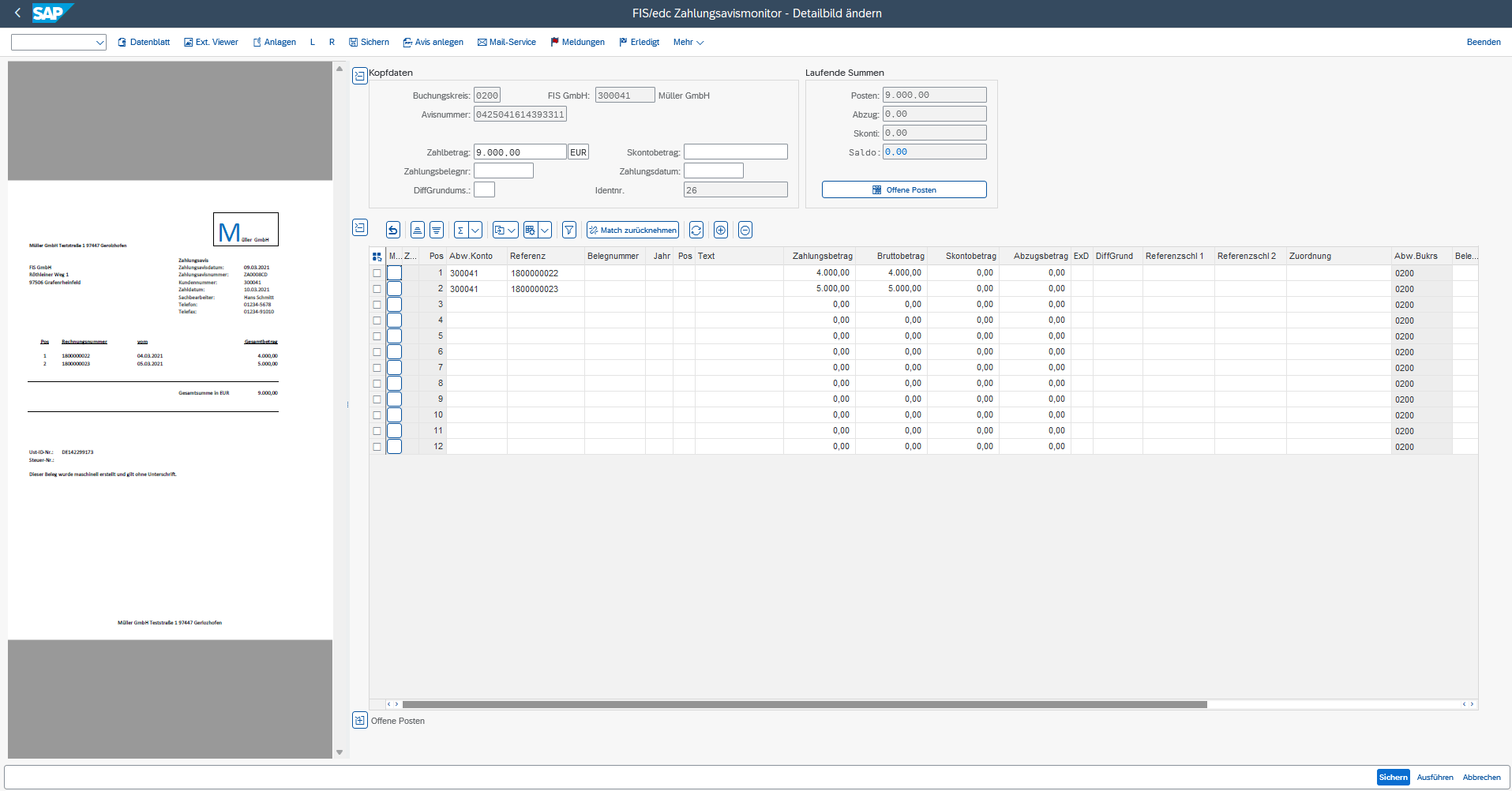
SAP-Oberfläche des FIS/edc Zahlungsavis-Monitors zur Bearbeitung eines Zahlungsavises. Links ist das eingescannte Avis-Dokument der Müller GmbH mit Rechnungsdaten und Zahlungsbeträgen sichtbar. Rechts werden Kopfdaten wie Buchungskreis, Zahlbetrag und Zahlungsdatum angezeigt. Im unteren Bereich befindet sich eine tabellarische Übersicht mit Zahlungspositionen, Referenzen, Zahlungsbeträgen und Buchungskreisen. Zwei Rechnungen mit Beträgen von 4.000 € und 5.000 € sind den jeweiligen Konten zugeordnet. Schaltflächen wie „Sichern“, „Ausführen“ und „Abbrechen“ sind unten rechts sichtbar.
FIS/edc for payment orders

What functions does the FIS solution for payment advices include?

1. Automatic entry and processing of payment advices

  • Recognition and import of payment advices from different sources: e-mail, PDF, EDI, Excel or paper (OCR)  
  • Data extraction of relevant information, such as invoice number, amount, customer and payment reference  
  • Direct transfer of the extracted data to the SAP system 

2. Automatic matching with open items

  • Check as to whether the invoices specified in the payment advice match with open items 
  • Automatic assignment of partial payments, deductions of cash discount or differences 
  • If differences are recognized, notifications are sent to the responsible accounting clerk 

3. Intelligent (cash) discount check

  • Automatic calculation and consideration of (cash) discounts in accordance with the defined terms of payment 
  • Identification of unauthorized cash discount deductions or missing payments 

4. Direct posting or manual correction

  • If all data matches, the incoming payment is updated automatically 
  • In the event of discrepancies, the monitor enables quick manual clarification and adjustment 

5. Central overview and reporting

  • All payment advices are displayed in a central user interface 
  • Detailed analysis and tracking of incoming payments 
  • Historical payment advice data can be used for better financial budgeting 

What are the benefits of FIS/edc for payment advices?

  • Time saving and reduction of error rate through high degree of automation 
  • Improved liquidity management through regular monitoring of payment periods of open items 
  • Automatic matching with open customer items when receiving payment advices 
  • High transparency through data matching at item level 
  • Uniform process for all entry channels (OCR, e-mail, EDI) 
  • Complete documentation of announced payments 
  • Faster processing times due to the automation of individual process steps 

How can automation be successful?

Automation is achieved through the intelligent matching of payment advice data with open items in the SAP system. The following technologies are used here: 

  • OCR recognition for paper documents and PDF files: OCR technology automatically enters paper documents and PDF files and extracts the relevant payment information to avoid manual data entry. 
  • EDI integration for electronic payment advice data: EDI-based systems enable the seamless exchange of payment advice data and the automatic processing of this information without manual intervention. 
  • Automated workflows for processing and posting: The automated processing of payment advices and the subsequent posting of payments enable fast and error-free processing. 
  • Rule-based logic for cash discount, partial payments and difference check: The application of predefined rules automatically checks cash discount claims, partial payments and possible differences to ensure precise and rule-compliant posting. 
  • Process control through the monitor: The monitor takes over the entire process control and ensures that only deviating or unassignable payments are reported to the responsible accounting clerk for further processing. 

What enterprises is the solution suitable for?

FIS/edc for payment advices is aimed at the finance and accounting departments in companies with a high volume of incoming payments. For SAP users who want to further automate and optimize their processes and are looking for seamless integration into existing processes. 

Conclusion

With FIS/edc for payment advices, companies fully automate the processing of incoming payment advices – regardless of the format or entry channel. The solution ensures error-free assignment to open items, optimizes liquidity management and relieves the accounting department through faster and more precise posting processes. Automated processing significantly increases efficiency and creates transparency throughout the entire payment process, especially with high incoming payment volumes. 

FAQ – Frequently asked questions

FIS/edc is an SAP optimization for the areas of accounting, purchasing and sales and distribution. The Electronic Document Center for SAP can be used for entering, processing and archiving documents (e.g. invoices, delivery notes, orders) and electronic formats (e.g. ZUGFeRD, EDI, XRechnung) in an automated way. This ensures a high automation degree of processes as well as consistent information flow.

  • Higher productivity due to automated processes
  • Full integration into the SAP system
  • Improved cash management
  • Shorter payment cycles
  • Higher transparency of invoice verification
  • Integrated mobile approval procedures for invoice verification
  • Automated sales order processing