The End of Support Is Drawing Near! – This Is how a Successful Migration from SAP PI/PO to SAP Integration Suite Will Be Achieved
July 22, 2025 | Reading time: Approx. 6 minutes

Consultant Business Process Integration at FIS
The proven SAP PI/PO Business Process Integration Tool will be retired with the end of maintenance in 2027. Already today it is necessary to make appropriate preparations for the migration to the succession solution. In this article, you will learn how to transition to SAP Integration Suite effortlessly by using the Migration Assessment.
With SAP Process Integration (PI) and SAP Process Orchestration (PO), it has been possible for a long time to develop stable and feature-rich integration solutions.
With the end of maintenance for SAP PI/PO by the end of 2027, however, it is about time to start looking for a succession solution. SAP provides SAP Integration Suite as the recommended integration platform for this purpose.
What is SAP Integration Suite?
SAP Integration Suite is an integration platform as a service (iPaas). It is part of SAP BTP. The suite combines a collection of services and functions that support, for instance, the design of integration processes (cloud integration) or the exposure of APIs (API management).
The “Open Connectors” allow digital processes to be extended to non-SAP systems as well. The associated Connectors Catalog provides an insight into the possibilities. The Integration Assessment is available for analyzing the system landscape and classifying the integration processes into “integration domains”. It is based on SAP’s long-established ISA-M methodology.
Another service is the “Migration Assessment”. This function is part of SAP Integration Suite, which supports the migration from SAP PI/PO to SAP Integration Suite while evaluating existing integration processes and allowing you to estimate the expected complexity or project.
How does Migration Assessment work?
For some time now, it has been possible to migrate configurations manually to SAP Integration Suite. However, since the beginning of the year, SAP has been providing a migration tool that supports the migration of integration scenarios.
To this end, data is extracted from the previous SAP PO and then evaluated. As a result, all configuration objects including the complexity of their migration are listed. Furthermore, an estimation is provided that allows conclusions to be drawn about the potential effort required for their migration.
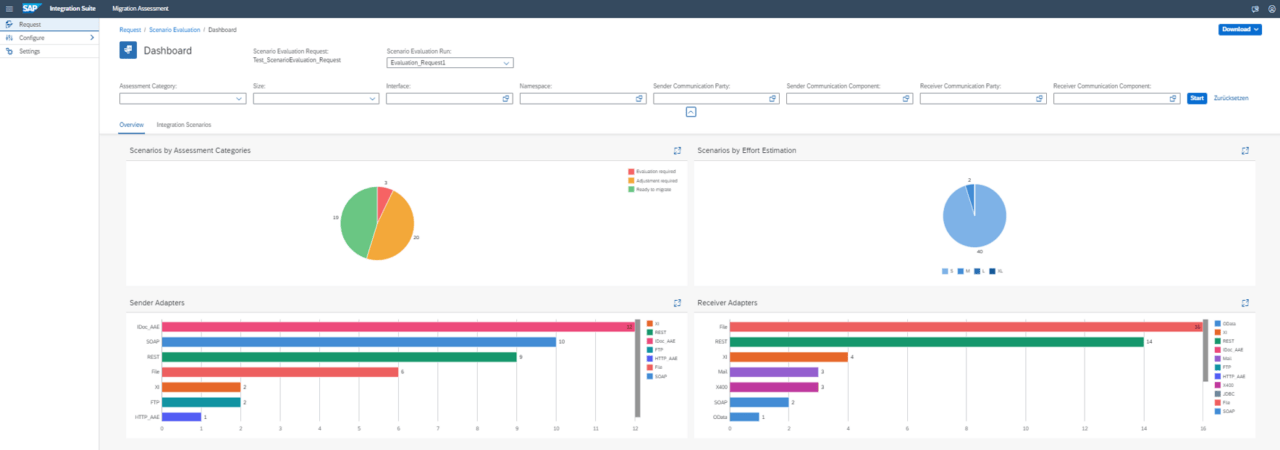
To use the migration tool, you must activate the “Migration Assessment” function in the SAP BTP Cockpit. In order to extract data from the SAP PO system, it must be possible to access various endpoints of the SAP PO system.
By using the Cloud Connector, these endpoints can be made securely available. Finally, connect the SAP PO system to the Migration Assessment application and the migration tool is ready for use.
Now, the data from the connected on-premise system can be queried or collected. This serves as the basis for subsequent evaluation.
The information retrieved from SAP PO is evaluated based on predefined rules. Here, different weightings are assigned to the rules, meaning that some rules have a greater influence on the estimation of the migration effort than others.

The Migration Assessment will answer the following questions:
How are the results of the Migration Assessment Tool evaluated?
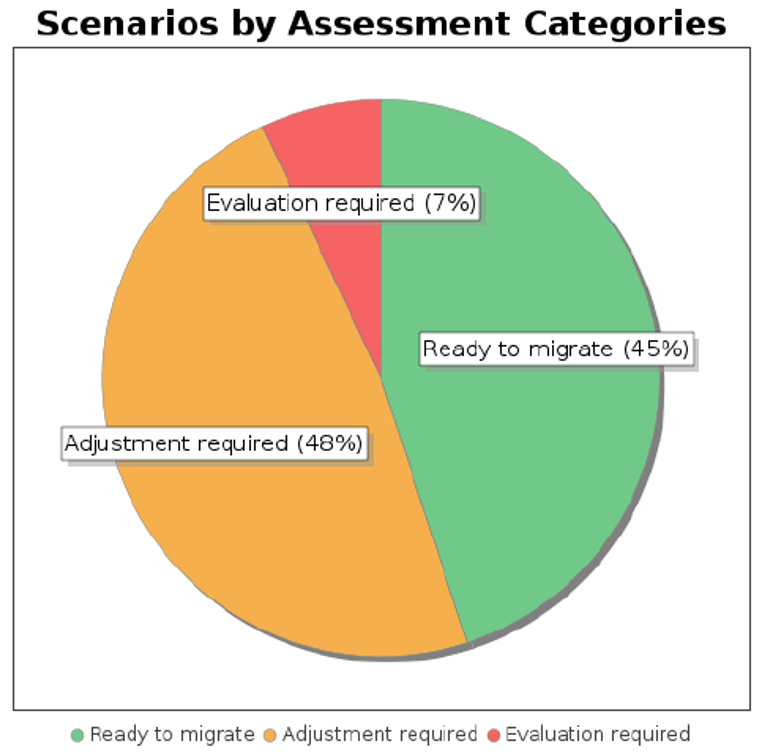
The Migration Assessment Tool divides the analyzed scenarios into three assessment categories: Evaluation required, Adjustment required, Ready to migrate.
“Evaluation required”:
These integration scenarios require detailed examination. The scenario cannot be transferred to the SAP Integration Suite in this form, for example, due to an unsupported communication adapter such as X.400.
The aim here is to identify possible solutions and examine how these can be mapped in the future.
“Adjustment required”:
These integration scenarios can be transferred manually or semi-automatically to SAP Integration Suite, provided that the necessary adjustments are made.
“Ready to migrate”:
These integration scenarios can also be transferred manually or semi-automatically to the SAP Integration Suite. Here as well additional steps may be necessary to make the scenarios available with the same functionality in SAP Integration Suite.
How are integration scenarios transferred from SAP PI/PO to SAP Integration Suite?
SAP Integration Suite provides a template-based function for the transfer of scenarios that integrates integration artifacts from SAP PI/PO into SAP Integration Suite. The use of SAP PO 7.5 SP06 or higher is required.
For this purpose, an integrated configuration can be selected from SAP PI/PO. After selecting a template for the migration (asynchronous/synchronous scenario, scenarios with Async-Sync Bridge), the objects of the integrated configuration are migrated to the integration flow of SAP Integration Suite.

Conclusion
The migration tool provides excellent support for migrating individual scenarios. However, practice shows that it does not work without intervention and reworking.
Furthermore, migration provides an opportunity to review the technologies and processes used and, if necessary, redesign them.
Since SAP Integration Suite already provides predefined standard content, migration offers the opportunity to transfer configuration scenarios to this predefined content.

Questions about this topic? Our team will be happy to assist you personally.

Read, take a look, inform yourself
In our download section, you will find a large number of SAP contents worth knowing – expert talks, white papers and flyers. To find right away what you are looking for, please use the filter function for topics and content type.
