SAP Material Master & Compliance – How Digital Workflows Help Comply with Legal Requirements
February 17, 2021 | Reading time: Approx. 8 minutes

Freelance Copywriter for IT and technology companies
The user departments must be involved in the process to make sure that material master data is always maintained in compliance with applicable regulations. The easiest way to do this is by means of a workflow. What such a workflow might look like can be learned from the article.

The maintenance of material masters is often a great challenge for SAP user companies. New materials must be continuously created or existing ones extended.
However, the master data teams are usually overstretched and, in practice, obtaining technical input is often quite difficult for stakeholders such as accounting department, purchasing department or Sales and Distribution. Coordination usually takes place via e-mail, which means that the processes are nontransparent and slow.
Moreover, material data as essential data object for business transactions must meet specific requirements and are therefore relevant for compliance.
If the internal processes cannot ensure the compliance with such specifications, the consequences can be unpleasant for companies. In the simplest case, there will only be an additional amount of time and effort for adjusting incorrect postings. In the worst case, however, export problems may occur if goods are not labelled correctly.
How a material master workflow simplifies the process
Companies can map their processes for the requisition and maintenance of SAP materials as electronic workflows. This helps accelerate the processes of material master maintenance and simplify the coordination between the departments.
Manual and non-transparent processes via e-mail or Excel are no longer necessary. This has a positive effect on master data quality and also ensures that compliance requirements are met.
The following example describes a workflow for requesting a new SAP material.
An SAP material master workflow using the example of FIS/mpm
The following example shows a material creation workflow with FIS/mpm, the master data tool by FIS. FIS/mpm is directly integrated in SAP and offers both tools for automated master data maintenance and workflows.
The example: The design engineer of a mechanical engineering company requires a new component for being used in bills of material. This component has to be created as material in the SAP ERP system so that it can be purchased from the vendor and processed in SAP in subsequent steps.
The departments of the mechanical engineer involved in material maintenance, such as accounting and purchasing department and, of course, the material master team, have together defined a meaningful workflow.
The workflow was then configured technically in the ERP system. Several approval levels were defined and the responsible approvers authorized using SAP authorization roles.
For the case described, the workflow might look like as follows:
Step 1: Design engineer requests new material
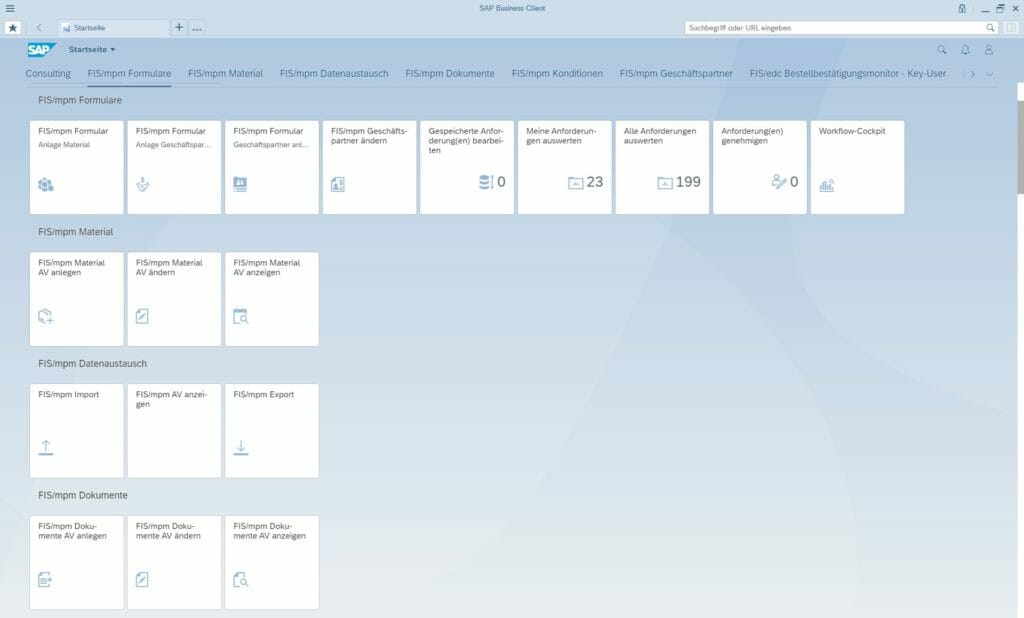
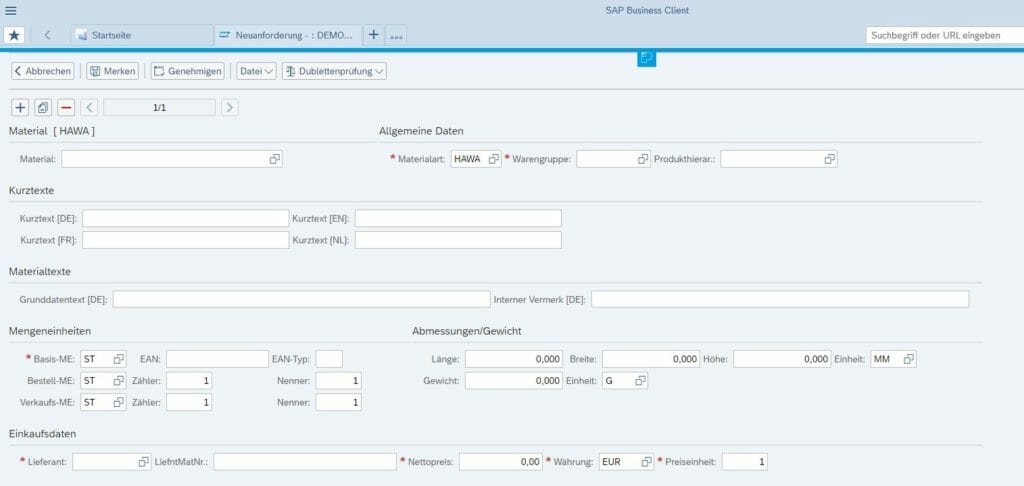
The design engineer calls the Web form for the “Initial material creation” workflow and precisely describes therein the material to be created.
The data and input fields queried were selected beforehand in such a way that the approvers participating in the workflow get a sufficiently good understanding of the requested material and clarification questions are usually not necessary. Should there be any doubts, the processors can return their questions directly from the SAP system to the design engineer via a workflow.
In addition to the text entries, the design engineer can also add documents or links to the workflow that describe the material more precisely.
Step 2: Material master team maintains general views
Once the design engineer has started the material request, the workflow is sent to the material master team at first. There, the persons responsible create the general material master views and maintain, for instance, the short and long texts considering the internal description rules.
This ensures that each material created in the SAP system gets a clear description. Consequently, the subsequent search in the system is facilitated, misclassifications are avoided and material master duplicates reduced.
In case of initial material creations, the majority of material master fields can automatically be preassigned using predefined rules. In practice often up to 90 percent. This reduces the processing effort and the risk of incorrect entries.
Step 3: Maintenance of accounting views by financial accounting
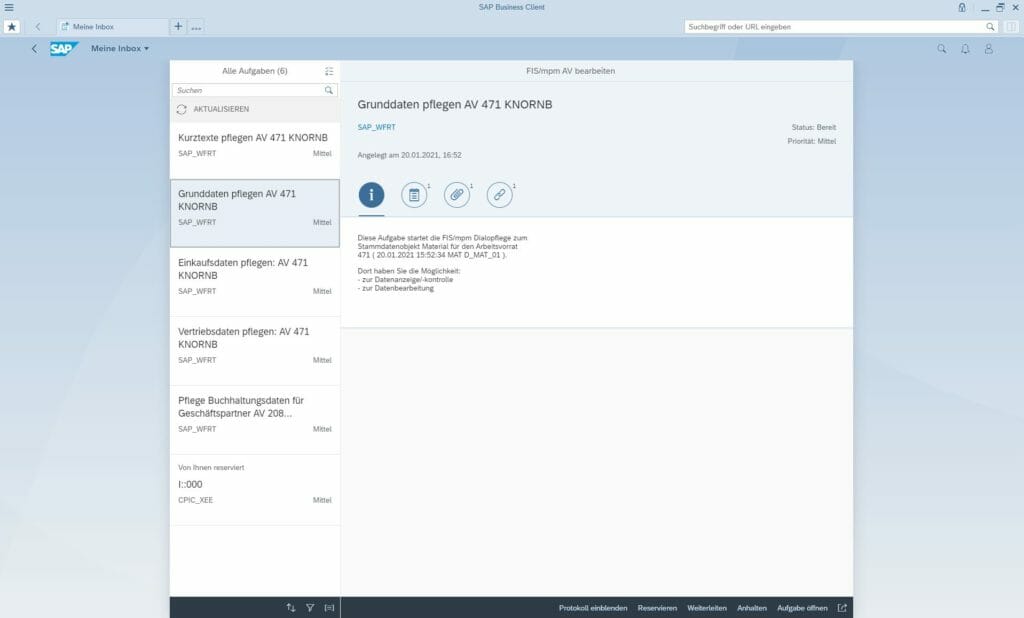
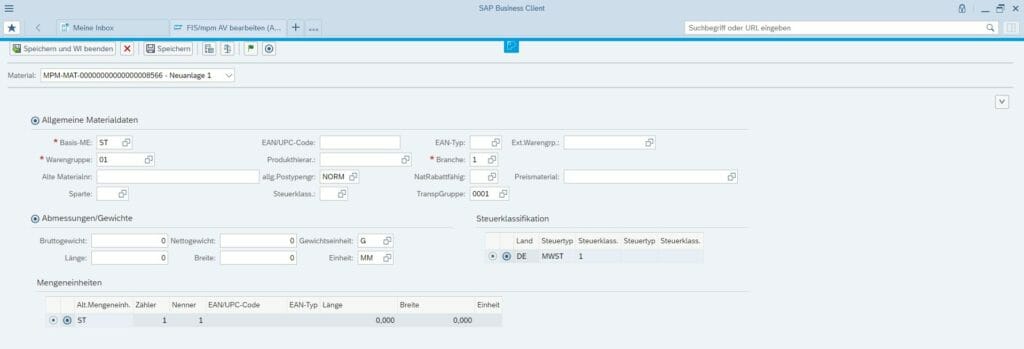
In a next step, the views and data fields relevant for FI/CO have to be maintained for the requested material. For this purpose, the master data workflow sends a notification to the responsible accounting employees.
An accounting employee opens the workflow, views the material descriptions and reflects on how to fill master record fields important for accounting with correct entries. Here, the material group is of particular importance as it indirectly controls the account determination in the SAP ERP system using the valuation class.
The example concerns externally procured goods purchased from an EU vendor. The appropriate material group must therefore be selected for this purpose.
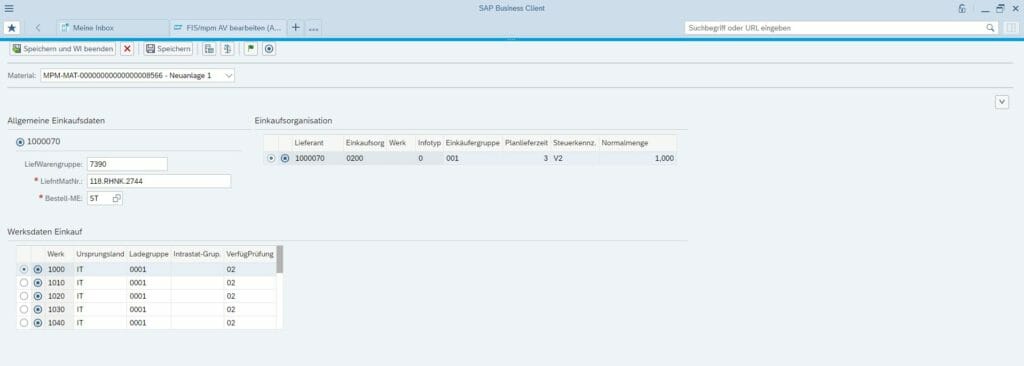
The FIS/mpm master data tool can be configured in such a way that the system, for instance, automatically proposes an appropriate material group. The system checks which material groups were entered for materials with similar properties – external procurement, EU vendor. In 95 percent of the cases, for instance, it was material group “7390”, which FIS/mpm adopts as default value that can of course be changed.
Likewise, FIS/mpm can also derive useful default values automatically for other material master fields, which reduces manual maintenance efforts to a minimum.
Step 4: Purchasing department maintains purchasing views
For purchasing the component, the purchasing view of the material needs to be maintained as well. The responsible purchasing employee maintains it and amends important master data fields, such as purchasing group or base unit of measure.
In this case, too, the automatic preassignment of material master fields considerable reduces the maintenance efforts. This means, for instance, that the purchasing group could automatically be derived due to material group and location.
Step 5: Export team maintains foreign trade views
In the next and last step of this example, the SAP workflow is sent to the export department for the foreign trade data of the material master record has to be maintained as well.
The correctness of data is extremely important in this respect since the material to be procured is integrated in a machine that is to be exported abroad.
For export and customs declaration, the team must prepare documents that are created on the basis of the material master data. This data must be absolutely correct in order to avoid problems when exporting the material abroad and make sure that the competent authorities approve the import into the target country.
In addition to the foreign trade data, the export employee also maintains data fields relevant for statistics, such as the commodity code. It is used for the Intrastat declaration.
Step 6: Design engineer will be informed once the material has been created
Material creation in the ERP system is finished once the material master workflow has been completed and all relevant departments have made their entries. The design engineer will be informed accordingly via e-mail.
Step 7: Regular monitoring
Master data tools can also be used for the monitoring of master data in the SAP production system. The integrated FIS/mpm analysis tool examines, for instance, used master data against data gaps or incorrect entries.
In this way, open purchase order items for which no commodity code was entered might be recognized. Automated plausibility checks can be made on the basis of rules in order to identify potential master data errors.
SAP workflows in material master maintenance for more efficiency
The technical coordination necessary for correctly filling material master fields is simplified by electronic workflows for requesting and maintaining SAP materials.
As a consequence, an efficient and electronic process ensures the compliance with operational and legal requirements concerning material master data. All processing and approval steps are automatically documented by the system, which simplifies internal controls.
As workflows can be displayed in parallel, several workflow users process one request at the same time. This ensures quick workflows and, therefore, quick material master creations.

Questions about this topic? Our team will be happy to assist you personally.

Read, take a look, inform yourself
In our download section, you will find a large number of SAP contents worth knowing – expert talks, white papers and flyers. To find right away what you are looking for, please use the filter function for topics and content type.
